<?xml version="1.0" encoding="utf-8"?><feed xmlns="http://www.w3.org/2005/Atom" ><generator uri="https://jekyllrb.com/" version="3.10.0">Jekyll</generator><link href="https://jx-3p.com/feed.xml" rel="self" type="application/atom+xml" /><link href="https://jx-3p.com/" rel="alternate" type="text/html" /><updated>2026-08-23T07:47:36+00:00</updated><id>https://jx-3p.com/feed.xml</id><title type="html">JP Patches</title><subtitle>Free Mac app for the Roland JX-3P synthesizer — save, edit, organize, and share JX-3P patches and sequences. A modern patch editor and librarian that talks to the JX-3P over tape dump.</subtitle><entry><title type="html">Windows Dressing!</title><link href="https://jx-3p.com/notes/windows-dressing/" rel="alternate" type="text/html" title="Windows Dressing!" /><published>2026-08-15T00:00:00+00:00</published><updated>2026-08-15T00:00:00+00:00</updated><id>https://jx-3p.com/notes/windows-dressing</id><content type="html" xml:base="https://jx-3p.com/notes/windows-dressing/"><![CDATA[<p>To whoever reads my missives — today is a medium-sized-to-big day! I’m releasing an official signed Windows version of JP Patches. Paperclip Bob would be proud.</p>

<p>What does this mean for PC users? Two things. Windows will now show my name, Daniel Spils, instead of warning you about an unknown publisher — you may still see a SmartScreen notice for a while, but that fades as more people download it. And JP Patches now updates itself on Windows, the way it always has on Mac. No more re-downloading every release.</p>

<p>Hope you’re enjoying JP Patches. <a href="/feedback/">Drop me a line</a> — I’d love to hear how you’re using it in the wild.</p>

<p>— Daniel</p>

<p>Next up: MIDI integration (I’m just waiting for the <a href="https://seriescircuits.com/product/jx-3p-midi-upgrade-kit/">Series Circuits MIDI kit</a> to be installed in my JX-3P).</p>]]></content><author><name></name></author><summary type="html"><![CDATA[To whoever reads my missives — today is a medium-sized-to-big day! I’m releasing an official signed Windows version of JP Patches. Paperclip Bob would be proud.]]></summary></entry><entry><title type="html">Secrets of the Sequence Editor</title><link href="https://jx-3p.com/notes/secrets-of-the-sequence-editor/" rel="alternate" type="text/html" title="Secrets of the Sequence Editor" /><published>2026-07-06T00:00:00+00:00</published><updated>2026-07-06T00:00:00+00:00</updated><id>https://jx-3p.com/notes/secrets-of-the-sequence-editor</id><content type="html" xml:base="https://jx-3p.com/notes/secrets-of-the-sequence-editor/"><![CDATA[<p>Prior to JP Patches, you had to sacrifice a sequence in order to write a new one. No more. Now you can save sequences from your JX-3P → JP Patches and zap them from JP → JX. Within JP Patches, the sequence editor allows you to:</p>

<ul>
  <li>Preview sequences (with a general square-wave tone)</li>
  <li>Press the space bar to start and stop playback</li>
  <li>Double-press the space bar (or left arrow) to return to the beginning</li>
  <li>Click any note to hear its pitch</li>
  <li>Toggle the :|| repeat icon to loop the whole sequence or a single page</li>
  <li>Drag the playbar forward and backward to scrub notes</li>
</ul>

<p>JX-3P sequences are saved as 8 “pages.” When a sequence tape dump goes JP → JX, you’ll hear 8 sections in the audio (really 16, because each page is repeated so the JX can confirm the data). The sequence editor reflects that structure: an ALL view showing the entire sequence and individual 1–8 buttons for each page. JX sequences max out at 128 steps — notes, rests, and ties combined.</p>

<p>When viewing an individual page (the 1–8 buttons):</p>

<ul>
  <li>Edit a note’s pitch by dragging it up or down</li>
  <li>Delete a note by selecting it and pressing Delete</li>
  <li>Add a note, rest, or tie by clicking an empty cell and selecting the icon that appears (JP is smart — it only reveals the icons the JX-3P sequencer allows in that position)</li>
  <li>Adjust tempo by clicking the “50%” indicator in the lower toolbar</li>
  <li>Click “Create New Sequence” button to start from scratch (button appears when sequence editor is empty)</li>
  <li>Click+drag to select multiple notes in a cell — then move it as one.</li>
</ul>

<p>Library and shortcuts:</p>

<ul>
  <li>Click “Save” in the upper right of the editor to save a sequence (Save appears once a change has been made)</li>
  <li>Undo with Cmd/Ctrl+Z</li>
  <li>Redo with Shift+Cmd/Ctrl+Z</li>
  <li>Click the pencil icon in the library to add a custom name to your sequence</li>
  <li>Reorder your sequence library with drag-and-drop</li>
</ul>

<p>That’s a lot of sequence editor for one post. Go make some music!</p>]]></content><author><name></name></author><summary type="html"><![CDATA[Prior to JP Patches, you had to sacrifice a sequence in order to write a new one. No more.]]></summary></entry><entry><title type="html">Beta be gone — JP Patches 8.7 for Windows is live!</title><link href="https://jx-3p.com/notes/beta-be-gone/" rel="alternate" type="text/html" title="Beta be gone — JP Patches 8.7 for Windows is live!" /><published>2026-07-05T00:00:00+00:00</published><updated>2026-07-05T00:00:00+00:00</updated><id>https://jx-3p.com/notes/beta-be-gone</id><content type="html" xml:base="https://jx-3p.com/notes/beta-be-gone/"><![CDATA[<p>I spent much of the weekend with my $100 Windows Wonder, debugging and improving the Windows version of JP Patches. I released v8.7 a few minutes ago and Windows users should be good to go. (There is one small caveat: the feature called “What Does My Tape Dump Sound Like?” does not work on the Windows version when sending from the JX to JP Patches. There’s an audio-routing puzzle to solve there, and I hope to have it up and running in a few days.)</p>

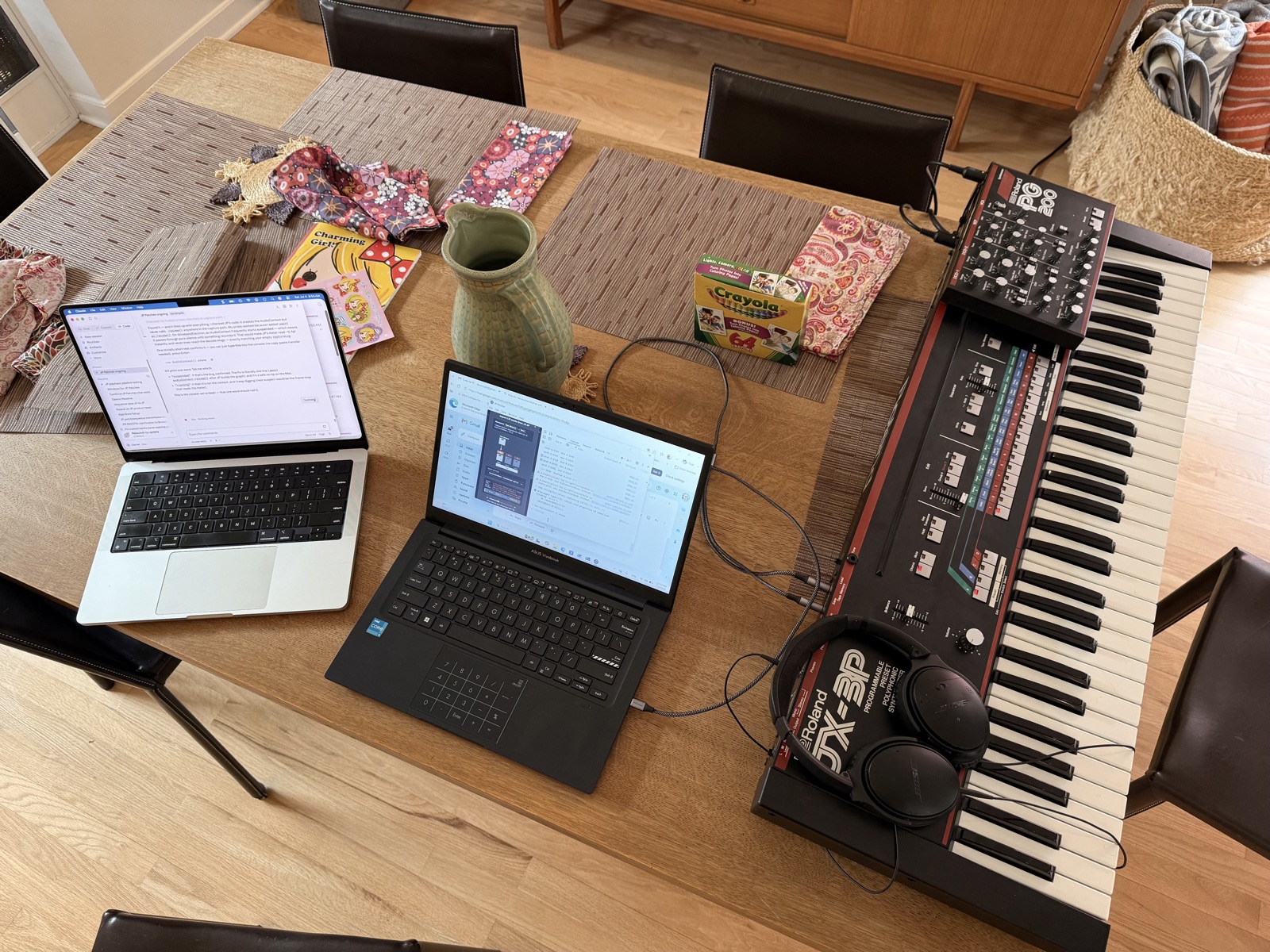
<p>Let me know if you discover any bugs (send me a note <a href="https://jx-3p.com/feedback/">here</a>)—thanks for waiting and happy synthing!</p>]]></content><author><name></name></author><summary type="html"><![CDATA[I spent much of the weekend with my $100 Windows Wonder squashing PC bugs and optimizing JP Patches for Windows]]></summary></entry><entry><title type="html">JP for PC — getting close</title><link href="https://jx-3p.com/notes/jp-for-pc-getting-close/" rel="alternate" type="text/html" title="JP for PC — getting close" /><published>2026-07-04T00:00:00+00:00</published><updated>2026-07-04T00:00:00+00:00</updated><id>https://jx-3p.com/notes/jp-for-pc-getting-close</id><content type="html" xml:base="https://jx-3p.com/notes/jp-for-pc-getting-close/"><![CDATA[<p><img src="/assets/img/jp-for-pc-setup.jpeg" alt="MacBook and ASUS Vivobook side by side on the dining table, both connected to a Roland JX-3P synthesizer with PG-200 programmer on top." /></p>

<p>A hundred bucks on Facebook Marketplace bought me the machine I needed to port JP Patches to Windows. After a weekend of setup, the app runs. Patches and sequences transfer to the JX-3P. There’s a thirty-second hang between dialogs I’m chasing down, and the window is slightly too big for the screen. Nothing that isn’t fixable. Stay tuned.</p>]]></content><author><name></name></author><summary type="html"><![CDATA[A hundred bucks on Facebook Marketplace bought me the machine I needed to port JP Patches to Windows.]]></summary></entry><entry><title type="html">Missing Music: how I fixed tape dumps.</title><link href="https://jx-3p.com/notes/the-missing-music/" rel="alternate" type="text/html" title="Missing Music: how I fixed tape dumps." /><published>2026-06-28T00:00:00+00:00</published><updated>2026-06-28T00:00:00+00:00</updated><id>https://jx-3p.com/notes/the-missing-music</id><content type="html" xml:base="https://jx-3p.com/notes/the-missing-music/"><![CDATA[<p>I’ve wished for many years that a program like JP Patches existed. In 1984, as a sophomore in high school, I bought a JX-3P synthesizer. The 32 custom user patches allowed me to create sounds within the synth. The only way to create more than 32 sounds was to store them in the way of computers of that era: by screaming the data (modem-style) onto cassette tape through a 1/4” audio jack.</p>

<p>But that is such a royal pain in the butt—why couldn’t this be as easy as connecting a cord from my synth to the computer to save all my sounds and sequences?</p>

<p>By the time personal computers grew powerful enough to do anything interesting with this idea, decades had passed. My sounds saved on cassettes had been recorded over or dumped off at the Bishop’s Attic (the Anchorage equivalent of Goodwill). The sounds and sequences I’d programmed since high school were gone forever. “Lost in time, like tears in rain.”</p>

<p>Last month, it dawned on me that AI could help. I talked to a few developer friends and they pointed me to Claude. Then, I started talking to Claude. At first I told it what I wished JP Patches would look like. Then, about what I wanted it to do. Within a few weeks, my app did what the cassette tapes used to do (and much more). JP Patches became a librarian for a forty-year-old synthesizer. The app captured the synth’s screeching tape dumps as audio, decoded them into patches and sequences, and allowed me to name, organize, and send ‘em back to the JX-3P. It mostly worked. I was thrilled!</p>

<p>Then, a week ago, it mostly stopped working.</p>

<p>The symptoms maddened me in the way only intermittent bugs can. Patches arrived with their sound but not their names. Other times their names arrived orphaned, with no sound. Sequences came back missing pages of notes. The patterns were random, without rhythm or rhyme. The failures appeared on both my upstairs setup (one synth, one MacBook) and my downstairs setup (another synth, a Mac mini)—two rigs failing in the same week, which seemed mathematically impossible to me, but absolutely possible to my new pal Claude.</p>

<p>So began the hunting expedition. Claude and I spent an entire weekend chasing everything in sequence, blaming the $16 cable I’d bought from Amazon. The aging synth. The latest macOS update. The auto-calibration code, the decoder, an obscure interaction between two software features written months apart. Each theory survived a few experiments, then collapsed.</p>

<p>We downgraded the app to a version from before any of this could have started; it failed the same way. By Sunday morning Claude had cornered the problem onto the only remaining suspect: aging hardware. The synthesizer was forty-one years old. The analog signal was, in Claude’s words, “drifting.” Time was passing (see: tears, rain).</p>

<p>But I couldn’t let go so I did something very human. I listened.</p>

<p>Months earlier, during development, I had built a quirky feature into the app called “What does my tape dump sound like?”—a slider that played back the hiss and screech so I could hear the nostalgic sound of a 1983 tape dump transmission, and also so I could verify the cable was working. I thought I may be the only person to use it.</p>

<p>Now it had become diagnostic. With the tape dump audible, I could hear what Claude couldn’t: tiny interruptions in what should have been a continuous wall of sound. I recorded the same dump in QuickTime, played it back, and heard no gaps at all. Same synth, same cable, same Mac, captured seconds apart—one recording clean, the other punctuated with audible gaps.</p>

<p>The source of this missing data turned out to be two lines of code that convert tape dump audio from one sample rate to another—a conversion the Mac performs in real time, imprecisely, introducing tiny timing errors. The shorter dumps (individual patches, 286 bits) usually survived. The longer ones (sequence pages, 1463 bits) often didn’t. The 1983 synth had transmitted perfectly the whole time. The 2026 app had subtly garbled it.</p>

<p>Claude had measured the audio every way a computer can measure audio—zero-crossing rates, RMS levels, spectral content, jitter distributions—and found nothing wrong. The signal was, by every quantitative standard, clean. But I could hear that something was off. What the measurements missed, my ear caught: a rest where a note should have been.</p>

<p>So I asked Claude to remove those two lines of code (in a sea of twenty-three thousand) and now JP patches records tape dumps at whatever sample rate comes its way. It solves a mystery that had hidden in the code for weeks—until this human heard the missing melody in a noisy tape dump.</p>]]></content><author><name></name></author><summary type="html"><![CDATA[I’ve wished for many years that a program like JP Patches existed. In 1984, as a sophomore in high school, I bought a JX-3P synthesizer. The 32 custom user patches allowed me to create sounds within the synth. The only way to create more than 32 sounds was to store them in the way of computers of that era: by screaming the data (modem-style) onto cassette tape through a 1/4” audio jack.]]></summary></entry><entry><title type="html">Everything patches</title><link href="https://jx-3p.com/notes/everything-patches/" rel="alternate" type="text/html" title="Everything patches" /><published>2026-06-26T00:00:00+00:00</published><updated>2026-06-26T00:00:00+00:00</updated><id>https://jx-3p.com/notes/everything-patches</id><content type="html" xml:base="https://jx-3p.com/notes/everything-patches/"><![CDATA[<p>Here I take you through how to move a set of C/D banks from the library tab to
the active C/D banks in the JP Patches app. Then we send those same C/D banks
over to the JX-3P synth.</p>

<p>Other topics: custom patch names, drag-and-drop reorder, custom banks, patch
provenance … basically, everything patches!</p>]]></content><author><name></name></author><summary type="html"><![CDATA[Here I take you through how to move a set of C/D banks from the library tab to the active C/D banks in the JP Patches app. Then we send those same C/D banks over to the JX-3P synth.]]></summary></entry></feed>